To the mail that piles up,
add the value of AI.
Manage the email and attachments accumulating in your company in one place, and use AI to find and use what you need faster. Mail is where a company's most powerful data piles up — and the space that goes most unused.

MailInsight on video
Episode 1 shows in 1 minute how we store, find and protect mail and attachments. Episode 2 shows in 1 minute 15 seconds how a new owner continues a negotiation from their predecessor’s records.
“What price did we quote last time, and what did the customer say?”
One question is all it takes.
- What price did we quote last time, and what did the customer say?
- What price did former employee Hong Gil-dong offer to client A?
- Find the official letter we sent to Company A three years ago
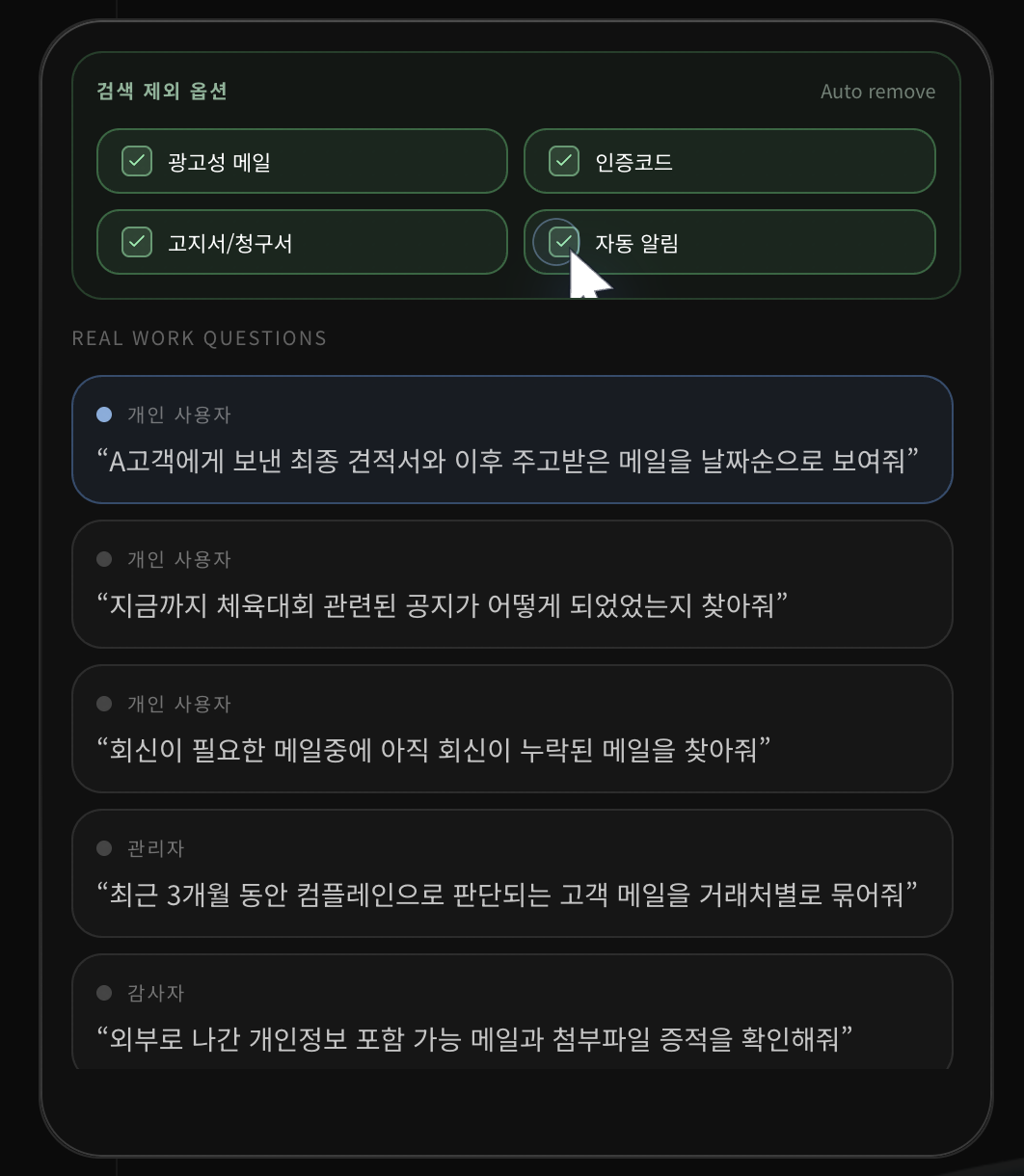
Marketing mail, verification codes, bills and automated notifications that clutter search are filtered out; the mail, attachments, clients, contacts and dates that matter for real work are laid out clearly. AI searches the body and the attachment contents, and answers with the source emails.
Incoming mail is deduplicated, compressed and stored,
and AI finds the answers you need inside it.
Journaling, relay and APIs gather inbound and outbound mail, attachments and even externally shared link files in one place.
Deduplicated and compressed for long-term storage under your company's policy. Years of mail kept intact without the storage burden.
Classifies marketing, verification codes, bills and work mail, then finds the relevant source emails and attachments first to ground its answers.
Screens and insights matched to the permissions and role of each individual user, auditor and administrator.
The more mail you have, the bigger the problems grow —
across security, operations, evidence and daily work.
This isn't a product for storing more. It organizes and solves the recurring problems of corporate email, perspective by perspective.
Mail saved to personal PCs via POP3 and PST, history scattered among former employees and field staff, untracked attachment exports. And judging an impersonation email that slipped past the gateway is left to the individual.
Large mailboxes and attachments pile up, and duplicate mail and repeated attachments keep inflating mail server and backup capacity along with the management burden.
Expired external link files, missing contract, quote and purchase order attachments, original emails nowhere to be found during an audit. When you have to prove something, the material is gone.
You need mail and attachments from years ago, but unlimited mailboxes aren't an option, and old work emails and important client replies get lost among ads, verification codes and bills.
Store email securely,
and organize it for reuse.
We turn email into an information asset with long-term storage, fast search and permission-based use — covering existing archiving functions while extending their value.
Important emails and attachments are stored securely in one central place.
Marketing mail, verification codes, bills and work mail are separated so you see only what you need, fast.
Old mail, customer history and attachments found in natural language, right when you need them.
Compared against stored history, it flags mail whose sender address or request differs from the usual.
Auditors and administrators review the evidence, risky mail and organizational mail flows they need.
The same data gives different answers for different roles.
“Find the emails that need a reply but haven't gotten one yet” — quickly locate quotes, customer communication and work history within your own permissions.
“Check outgoing emails and attachments that may contain personal data” — review original emails, attachment evidence and messages containing sensitive information.
“Group the customer emails from the last 3 months that look like complaints, by client” — see the organization's mail flow, client relationship network and risk signals at a glance.
You can't spot phishing
by looking at one email alone.
An impersonation email carries no malware and no links. A gateway asks “is this email dangerous?”, but impersonation requires asking “is this sender behaving as usual?” To notice what's unusual, you have to remember what's usual — MailInsight knows the years of mail exchanged with that client.
An impersonation email has no malicious attachment.
A domain created just before sending isn't listed yet.
A domain they registered themselves passes authentication normally.
Only a global baseline — it has no record of our dealings.
※ MailInsight is not a pre-delivery blocking gateway. It finds anomalies in mail already received and stored, alerts users and administrators, and works alongside your existing gateway. The longer an organization has archived, the more accurate its baseline.
Scattered mail becomes
the company record AI reads.
Contract terms, customer requirements, the reasoning behind decisions — most of a company's real work context lives in email and attachments. We collect, clean and structure this undocumented data into a corporate email knowledge base, so AI answers from your company's actual records rather than general knowledge.
Finding and analyzing mail happens inside the customer's own systems. External AI receives only the parts relevant to the question, and only when composing the answer.
With AI features turned off, it runs as pure email archiving — storage, search and audit evidence only — and sends nothing outside.
Employees see only their own mail; auditors and administrators see only approved scopes. AI answers within the user's permissions, too.
Every answer is shown with the source emails it's based on. Instead of trusting a summary, you open the original and check.
Even after an account is deleted, the mail remains, so whoever takes over can find open matters and attachments. Ready for handovers and audits as it is.
A copy is kept alongside your existing mail server, so how you send and receive mail doesn't change. Empty your mailbox and old mail and attachments are still right there.
Email is just the beginning.
A company's important work records don't live in email alone. MailInsight starts with email and will evolve to connect messaging, meetings, calls and other work communication into a single Company Memory.
Available now
Preserves, searches and analyzes mail and attachments.
Roadmap
Roadmap
Roadmap
Roadmap
※ Current features cover email. Message, Meeting, Voice and AI Conversation are future directions; no release date has been set.
Ready to work with FastPace?
From the first consultation through build and operations, we'll propose the most realistic path forward.
Contact Us →