Home › FastWorks
FastWorks · Custom business systems

The days when only big companies
got custom systems are over.

Using a separate solution each for HR, attendance, contracts and sales? Now you can build just the features you need into one system, the way your company actually works. The approval, HR and settlement records it handles accumulate as one body of company data AI can read.

Start with the Excel files and procedures you already use. We integrate with existing systems rather than replacing them.
HRAttendanceContracts SalesSettlementExcel ONE SYSTEM Our business system HR · AttendanceContracts · ApprovalsSales · Settlement Data entered once flows into the next task and accumulates as company data AI can read
Video · Saleser in 60 seconds

FastWorks Saleser on video

Saleser handles sales within FastWorks — customers, quotes, orders and settlement flow as one, and AI reads the record.

FastWorks Saleser (sales management) intro video (1 min)
Scattered Work

One tool per task —
is your list of solutions still growing?

Each one is convenient, but your company's work and data end up more fragmented. The same client, the same amount, the same person gets re-entered in every service.

E-contract service
ClientHanbit Industries Co.Re-entered
Contract amount24,800,000
Signature statusPending
Sales management solution
ClientHanbit Industries Co.Re-entered
Expected amount24,800,000
OwnerMinjun Kim
settlement_final_v7.xlsx
Hanbit Industries24,800,000Re-entered
Tax invoiceNot issued
PaymentNeeds check
Messenger
CEO · Where are we on the Hanbit contract?
Minjun Kim · Let me check. Could you send the file again?
Repeated entrySeparate accountsSubscription costsMissed tasks
The Excel Layer

And the gaps in between
are mostly filled by Excel.

Quotes, pricing, settlement, status reports. In many companies, the place where most work actually gets done is still Excel.

HR solutionEmployees · HR records
Attendance serviceClock-in/out · Leave
E-contractsSigning · Storage
Sales SaaSCustomers · Contact history
Every gap in between ↓
EXCEL Work no solution covers ends up here — under different names, but all in the same place
QuotesPrice listsSettlement sheetsSales statusCollectionsPurchase ordersInventory ledgerClient listWeekly reportsProject schedulesResults by ownerMonth-end closingAnd dozens more, different at every company…
One Size Fits All

But those solutions
weren't built just for your company.

Commercial groupware and ERP are built for many customers to share. They have plenty of features, but most of them aren't your company's work.

Features a commercial system provides (an illustrative list)Features your company actually usesFeatures almost never opened
E-approvalAttendanceE-contractsPayrollTraining recordsBenefitsPerformance reviewsCustomer managementAccounting vouchersAsset managementApproval requestsOrders · RevenuePurchase requestsWorkflow designPermission groupsSettlement · BillingOutsourcingAnd countless more…

More features doesn't mean a better fit for your company. The ones you never use stay right there in the menus and on the screens.

You pay for features you don't use

Features irrelevant to your work are baked into the menus, permissions, screens — and the price.

More features, harder to use

People get lost in menus, training drags on, and it ends up a system only a few staff actually use.

The features you need are shallow

Built to fit every company, the work that matters most to you is reduced to a few fields.

You don't need a system with more features.The few tasks your company actually does, built to the depth they really need — that's the system you need.
The Shift

The rules for building custom systems have changed.

Custom systems used to be large projects demanding many people, long timelines and high costs, so they were the domain of big companies. Today, cloud, standardized development, rich APIs and reusable business modules let us deliver what companies need far faster.

AspectCustom development thenCustom development now
Who buildsLarge projects, mostly for big companiesSMEs too, starting with what they need
CostHigh upfront costs in the hundreds of millions of wonReasonable cost matched to the scope of work and features
TimelineMonths to years to buildCore features built quickly, then improved
Starting scopeThe whole system built at once from the startStart with the work that matters, expand in stages
How it improvesComplex, rigid development proceduresReal user feedback reflected quickly
Development got faster, and the barriers to technology got lower.A custom system is now a question of need, not company size.
From Rented to Owned

Features you've been renting,
turned into your company's operating assets.

FastWorks doesn't ask you to replace everything at once. We move the essential features first, integrate with your existing solutions, and consolidate into your company's own system step by step.
Instead of fitting the company to the system, we fit the system to the company.
Start with what you needMirror your real workflowImprove in stages as you use itIntegrate with existing systems
HR · OrganizationEmployees, org chart, HR records
Attendance · LeaveClock-in/out, annual leave, work status
Contracts · ApprovalsContract drafting, approval, signing, storage
Customers · SalesCustomers, consultations, quotes, orders (CRM)
Orders · TasksOrders, purchase orders, work orders, schedules (ERP · MES)
Revenue · SettlementBilling, tax invoices, payments
Documents · DataForms, attachments, history
AI search · AnalysisQuestions answered from your work records
Anything else you needAny task your company has
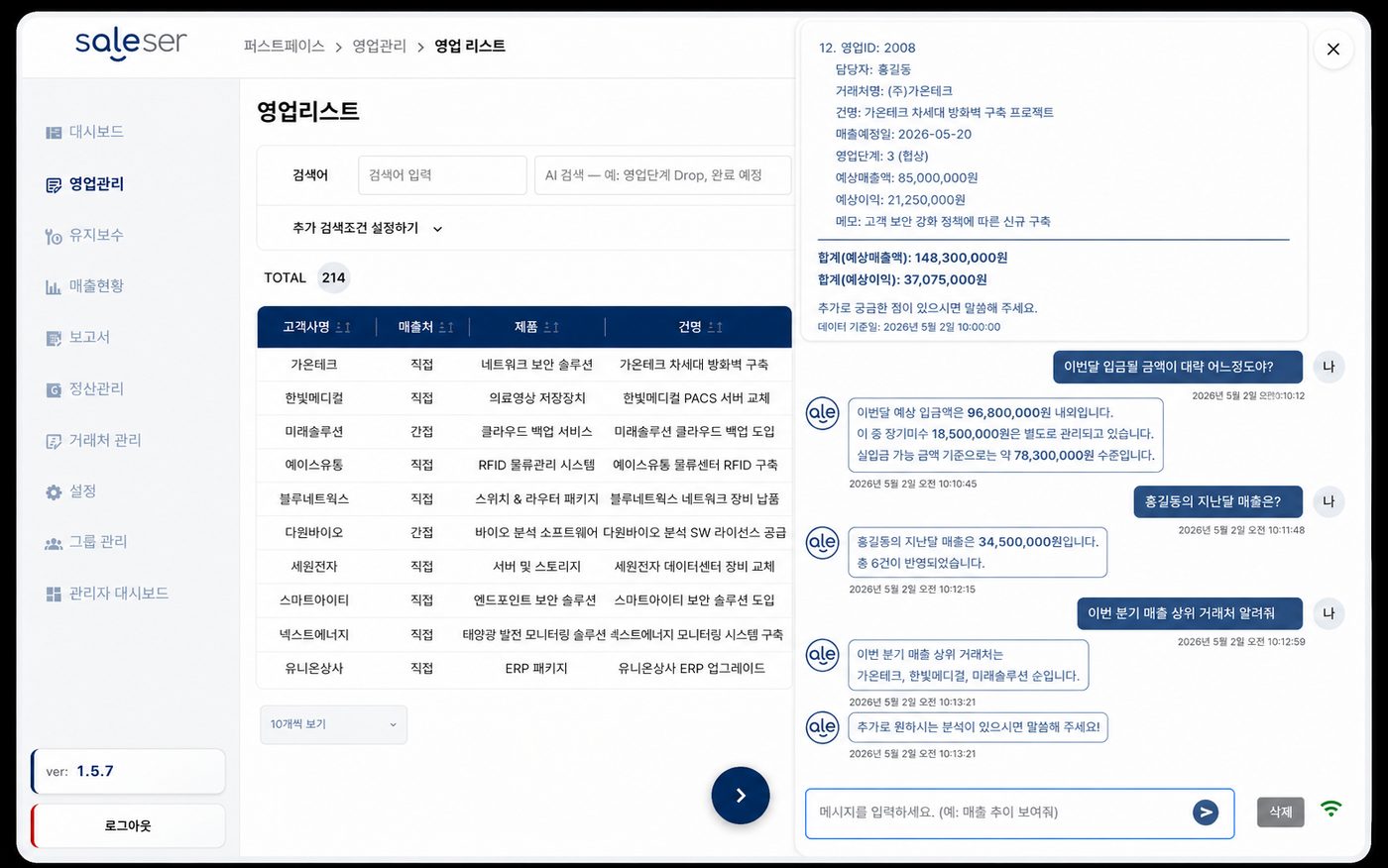
Example of an integrated sales and settlement screen
Customers · Sales — ask AI about revenue right from the sales list.
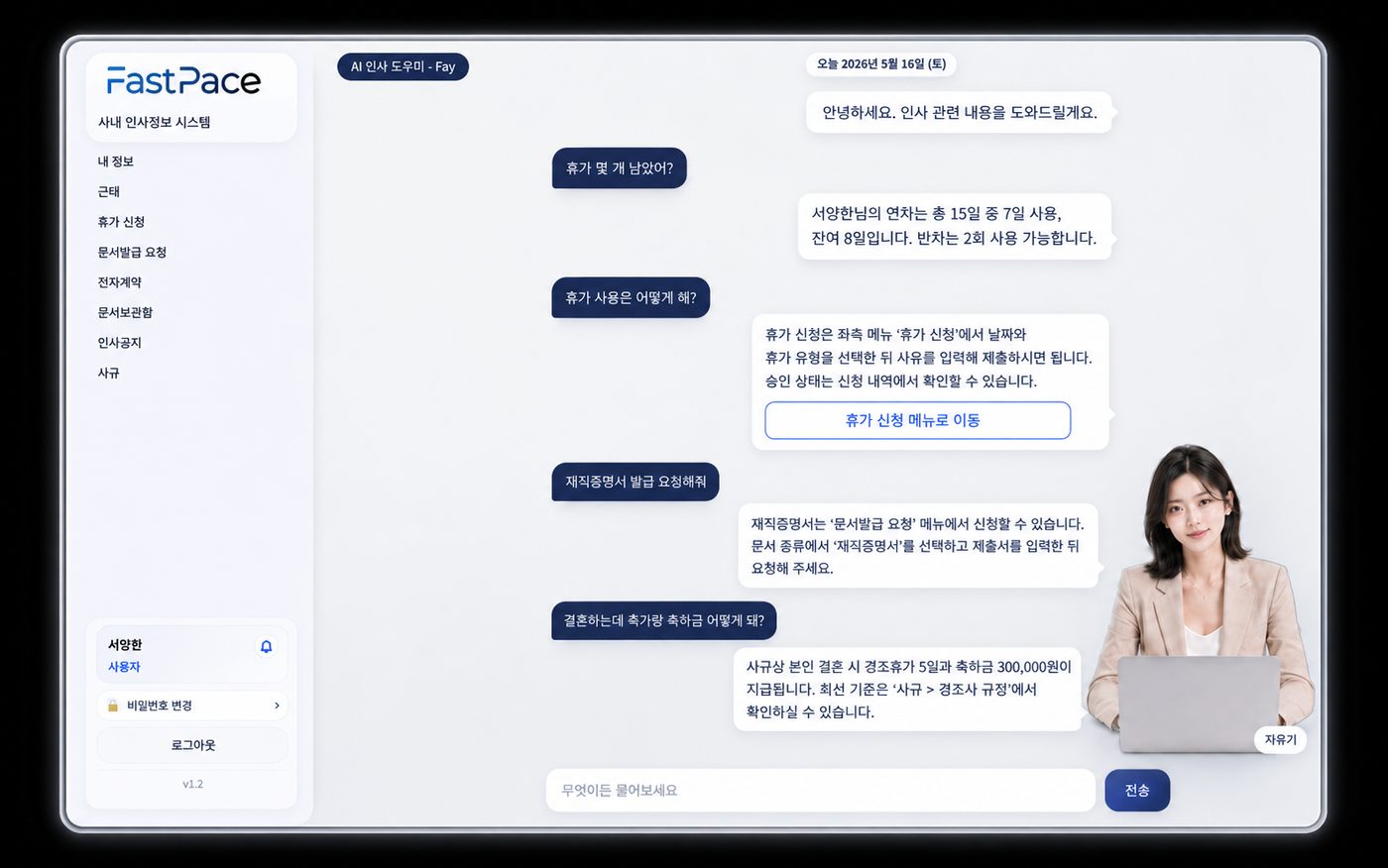
Example of the AI HR assistant screen
HR · Attendance — the AI HR assistant handles policies, leave and document requests.
Sales · CRMQuotes · ContractsOrders · PurchasingProduction · Work orders (MES)Inventory · ShippingRevenue · Settlement · Accounting (ERP)HR · AttendanceAssets · SuppliesE-approval · E-contractsAI search · Reporting
One Input, Connected Flow

Enter data once, and it flows into the next task.

Register an order once and the contract and owner are linked, work and delivery orders are generated, and the billing date and payment status are tracked in a single flow.

1
Inquiry · Opportunity loggedClient · Hanbit Industries Co.
Owner: Manager Minjun Kim · Expected amount KRW 24,800,000
2
Quote drafted & approvedClient and owner carried over automatically
Quote no. Q-2026-084 (auto-numbered)
3
Contract · Order confirmedGenerated automatically from the approved quote
Contract amount KRW 24,800,000 · Order confirmed on 2026-08-12
4
Work · Delivery orderDelivery due · 2026-09-05
Dept: Implementation Team 1 · Work order Auto-generated
5
Billing · Tax invoice issuedBilling due · 2026-09-10
Billed amount KRW 24,800,000 Carried over · Awaiting issue
6
Payment received · SettledReflected automatically in this month's settlement
From inquiry to payment, viewed as one flow
The goal isn't to pack in features.It's to make sure the work that genuinely has to flow through your company never breaks.
AI-Ready Data

Approvals, HR and settlement records too,
as one body of data AI can read.

Records scattered across separate tools and Excel files are something AI can't read. In FastWorks, the moment sales, approvals, HR and settlement are processed, the record accumulates as one body of company data — and that data becomes the basis for AI search and analysis.

1
Data accumulates as you workHR, attendance, contracts and approvals, orders and settlement are processed in one system and build up as company records. No separate tidying, no re-entry.
2
Those records become one dataset AI can readBecause it's structured company data rather than scattered files, AI knows where to look and what to find.
3
AI finds only what's needed and answersAsk, and it finds just what you need within your permissions — and carries on to the next action.
Company data AI reads
HR recordsAttendance · LeaveContracts · ApprovalsSales · QuotesOrders · DeliveriesRevenue · SettlementDocument formsAnd every other work record that accumulates

Mail and attachments are handled by MailInsight, while work records like approvals, HR and settlement are handled by FastWorks. Together, the two become the company memory AI reads.

AI doesn't make the decisions for you.Grounded in your company's actual records, it cuts the time your people spend searching.
How We Build

You don't have to build a giant system from day one.

FastWorks isn't a finished product we sell. It's a service: we diagnose your company's work together and actually build the features you need.

1Diagnose current work

We review your current solutions, Excel files, documents and actual workflow together.

2Analyze overlap and costs

We identify repeated data entry and subscription costs spread across multiple solutions.

3Set priorities

We scope the work that causes the most friction and offers the biggest gains first.

4Build core features

We quickly build screens and processes that reflect how you already work.

5Integrate and expand in stages

We integrate with existing systems and reflect real usage feedback.

How to Start

It's fine if you can't explain exactly
what kind of system you need.

1Diagnose→2Select→3Connect→4Expand
Is FastWorks a finished product?

No. We diagnose your work and design and build only the features you need. Every company that adopts it ends up with different screens and procedures.

Do we have to replace our existing ERP or SaaS?

No. We choose what makes sense — keep, integrate or replace. Services that work well for you are integrated and kept in use.

Can our existing Excel data be migrated?

Yes. After checking its structure and quality, we define the migration scope. Frequently used forms are reproduced on screen as they are.

How are scope and cost decided?

Not by user count alone. We look at feature scope, integrations, data migration and the complexity of the work together.

Also Included

The team that builds your business system
builds your web presence too.

Internal systems and your public-facing web aren't separate jobs. One team handles planning, design, development and deployment, designing data and operations together.

Web Application

We build business web applications your customers and partners use directly.

Corporate Website

We take corporate sites — company profile, careers and more — from planning to operation.

Product Landing Page

We create landing pages that introduce your products and services.

Custom Development

We do custom development that needs to integrate with existing systems.

Start with a diagnosis of your company's business systems.

Show us the Excel files and processes you use today, and we'll start by mapping out what can be connected and automated.

Request a Consultation →